How to Check CIBIL Score on Mobile: Step-by-Step Guide
Checking your CIBIL score on mobile means viewing your score directly from your phone, through a UPI app, your bank's own app, a bureau-partnered platform, or the official bureau's own mobile site, without needing a desktop or a separate visit anywhere.
Mohit Juneja
Reviewed by FREED India, Debt Resolution Specialists
 4.7/5
4.7/5 ₹3,200Cr+
 20,000+
 20,00,000+4.7/5₹3,200Cr+20,000+20,00,000+
KEY TAKEAWAYS

You can check your CIBIL score on mobile through several legitimate app categories, no single one is required.
Checking your own score on any legitimate app is a soft enquiry and does not lower it.
Many quick mobile checks focus on the score and a brief summary, while the depth of information varies by provider.
Your credit information is updated when lenders send new data to the bureau, so changes may not appear immediately after an account event.
Never enter your net-banking password, UPI PIN, CVV or other banking authentication credentials into a credit-score check.
How to Check CIBIL Score on Mobile
A handful of legitimate options exist, and none of them require picking a single "correct" one.
- UPI and payment apps with a built-in score-check feature. These typically show your score for free in a few taps, since it's built as a convenience feature for users already active in the app for other reasons.
- Your own bank's mobile banking app. Some banks offer credit-score checking through their official mobile apps.
- Standalone bureau-partnered platforms. These focus specifically on credit score checks, sometimes free, sometimes for a small fee, and often bring you in as a lead for other financial products.
- The official bureau's own mobile-friendly website. This works through a regular mobile browser rather than a dedicated app, and gives you the most direct source for what the score itself actually represents.
The best option depends on whether you want convenience, a quick score check or a detailed report. Which one makes sense for you often comes down to habit more than anything else, whichever app you already open daily is usually the path of least friction. Since these categories mainly differ in convenience and depth rather than accuracy, the next section covers why the landscape ended up looking this crowded in the first place.

Why There Are So Many Ways to Check Your Score on Mobile
The landscape looks crowded because several industries all landed on the same feature around the same time, for different reasons.
Some UPI and payment apps offer credit-score checking as an additional financial feature. Most major banks built the same feature separately into their own apps, since it's a low-cost way to add value for existing customers without much extra development. Several bureau-partnered platforms exist specifically to offer free or low-cost checks, using the score check itself as a way to bring people in for other financial products down the line.
None of this is a bad thing, and it's worth reframing the crowdedness as a genuine benefit rather than a source of confusion. Checking your own score through any of these legitimate options counts as a soft enquiry, so there's no real downside to trying a couple and settling on whichever one feels easiest to use regularly.
You genuinely can pick any one legitimate app and stick with it, there's no hidden trade-off in choosing convenience over some other option you haven't tried. It helps to think of this less like choosing a favorite tool and more like choosing a habit, the specific app matters far less than actually checking regularly and doing something with what you find. What matters more than which category you pick is confirming the specific app is actually legitimate in the first place, which is worth covering properly before jumping into the actual steps.

Freed Expert Tip
Pick one trusted app and stick with it. Bouncing between five different apps that each show a slightly different number just creates confusion, not clarity.
See the full pictureSigns a Mobile CIBIL Check App Is Legitimate
A few markers separate a legitimate score-check app from something worth avoiding, none of which require any technical expertise to spot.
- A legitimate score-check service may ask for PAN and other identity-verification details. It should never ask for your net-banking password, UPI PIN, CVV or other banking authentication credentials.
- It's a well-known, established app, not something downloaded from an unfamiliar link. Stick to apps you'd recognize from app store listings or existing daily use rather than one that arrived via a random message.
- It clearly states which bureau it pulls the score from. Transparency about the data source is a basic sign of a legitimate operation, vague or missing sourcing is a reason to be cautious.
- It doesn't pressure you with urgency, "check now before it's too late," to get a score checked. A credit score check has no genuine time pressure attached to it, urgency language here is a red flag, not a feature.
- It clearly identifies the credit bureau providing the score and explains what information or service you're receiving. A wildly different number from the same underlying data is worth investigating before trusting the app further.
Once an app passes this check, the actual steps to check your score take only a couple of minutes.

How to Check Your CIBIL Score on Mobile, Step by Step
The steps below apply broadly across app categories, though exact menu wording and layout will differ slightly depending on which specific app you're using.
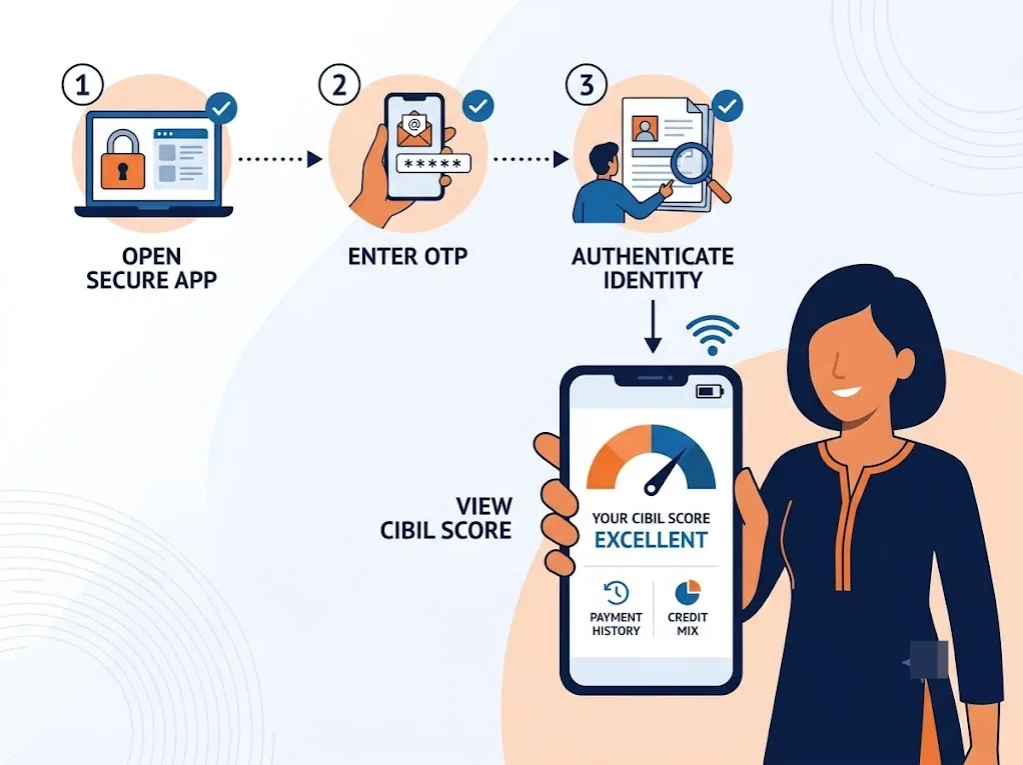
- Open Your Chosen App. Whichever legitimate app you're using, a UPI app, your bank's app, or a bureau-partnered platform.
- Find the Credit Score or CIBIL Section. Usually under a "money management," "financial health," or dedicated credit score tab.
- Verify Your Identity. Most apps ask for PAN confirmation and an OTP (One-Time Password, sent to your registered mobile number to confirm it's really you).
- Give Consent to Pull Your Score. A legitimate app clearly asks for your consent before fetching the report.
- View Your Score and Summary. Most apps show the number and a short one-line summary, not the full report.
That's genuinely all there is to it, five steps that take a couple of minutes on almost any legitimate platform. There's no separate account creation process beyond what you've likely already done to use the app for its primary purpose in the first place.
A couple of practical things worth expecting along the way. If the mobile number registered with your chosen app doesn't match the one linked to your actual credit file, the identity verification step might fail or ask for an alternate method. And if you've recently changed your registered mobile number without updating it everywhere, that mismatch is one of the more common reasons a check doesn't go through cleanly on the first attempt.
The steps look almost identical no matter which app category you're using. What actually differs is what you see once you've completed them, and that's worth understanding clearly before assuming any single check tells you everything you need to know.

What You'll See When You Check Your Score on Mobile
Across nearly every mobile app, the result screen shows the same basic pair of things: the score itself, somewhere on the 300 to 900 scale, and a short one-line summary label, something like "good" or "excellent" depending on where it lands.
That's typically the extent of it. What different bands like "good" or "excellent" actually mean in practical terms, what they unlock with a lender, isn't something most mobile apps explain, the label sits there for you to interpret largely on your own.
What's usually missing is worth naming clearly, since it applies across nearly every app in this category, not just one or two. If you need a detailed report, use a service that explicitly provides the full report and its supporting details. Mobile checks, across categories, are built for a quick glance, not a diagnostic.
For just wanting to know the number, this is genuinely enough for most people, most of the time. But if the score is lower than expected, or you're trying to actually understand what's behind it before a significant decision, this lighter view runs out of usefulness fairly quickly regardless of which app produced it.
For the number alone, mobile is enough. For understanding what's actually driving that number, a fuller report is worth getting separately, which the next section walks through.

Mobile Check vs Full Report, Which Should You Use?
Option | What You Get | Best For |
Quick mobile app check | Score number and short summary | A fast, casual look |
Official bureau full report | Full detailed report, downloadable | Before a major loan or card application |
Bureau-partnered platform (e.g. Credit Insights) | Score plus what's helping or hurting it, with recommendations | Someone who wants to act on the result, not just see a number |
A quick mobile check makes sense for a casual look, checking in every so often without needing much depth. Pulling the official full report makes more sense before something significant, a home loan, a large personal loan, anything where the exact detail actually matters to the outcome. A recommendation-based platform fits a third kind of moment entirely, when you're not just curious about the number but actually want to know what to do about it.
Each can be a legitimate option when you use the provider's official app or website and verify which bureau supplies the score. The right choice depends entirely on what you're trying to accomplish at that particular moment. It's also entirely reasonable to use more than one of these depending on the moment, a quick mobile check most months, and the fuller report or a recommendation-based platform only when something bigger is actually on the horizon.
Someone checking casually every couple of months has very different needs from someone actively preparing a loan application, and it's worth being honest with yourself about which situation you're actually in before deciding which of these three to reach for.
Your report typically refreshes on a monthly cycle as lenders send updated data, regardless of which app or platform you use to check it, so seeing the same number across a few checks in one month is expected, not a sign anything's stuck.
How FREED Helps You Go Beyond a Quick Mobile Check
Most mobile apps show you the number. FREED's Credit Insight tool shows you what's actually behind the score, what's currently helping it, what's hurting it, and step-by-step recommendations for improving it further, all pulled from your Experian credit report, based on the features currently offered. You can pull a free credit report from Experian through FREED and see each factor banks look at.
It's open to everyone, no enrollment in any FREED program required, and no minimum income or score threshold to subscribe. The subscription runs ₹249 for three months, which is worth weighing directly against the free-but-limited view most mobile checks offer, you're paying specifically for the depth a quick check doesn't provide.
To be clear, none of this is meant to knock the mobile apps covered earlier in this piece. A free, fast check on your phone is genuinely useful for exactly what it's built for, a quick glance rather than a full diagnosis. Think of it as a fine first step rather than a full replacement, the two aren't really competing for the same purpose.
Where Credit Insights actually earns its keep is the moment a quick number stops being enough, when you're trying to understand why the score sits where it does rather than just confirming what it currently reads. For someone who's tried a couple of the mobile options already and still feels like they're missing the full picture, that gap is exactly what this fills. Checking every few months, rather than only right before applying for something, gives enough lead time to actually address whatever turns up.
See What's Really Behind Your Score
Get the full picture, not just the number.
Check My Credit InsightsTips for Checking Your CIBIL Score on Mobile Safely
A few habits make mobile checking genuinely useful, rather than just a routine tap that tells you nothing new.
Stick to one or two trusted apps rather than trying every one that promises a free check. Bouncing between many different platforms mostly just creates confusing, slightly different numbers, without adding any real insight.
Never enter net banking or UPI PIN details on any score-check flow. A legitimate check only ever needs identity verification, never full banking credentials of any kind.
Set a monthly reminder instead of checking daily, since scores generally refresh on that same monthly cycle regardless of which app you're using. Checking more often than that just repeats a number that hasn't had time to change.
Different apps can show different numbers, but that's usually because they're pulling from different bureaus, not because one is stale. Cross-check against a second source before a big loan decision if a number looks off, and confirm which bureau each app is actually showing you.
Treat the mobile result as a starting point for action, not a final verdict. A number on its own doesn't tell you what to actually do next, that requires a bit more digging than a quick glance provides.
The app you use matters less than checking consistently and doing something useful with what you see.

Mohit Juneja
Mohit Juneja writes educational content at FREED on debt management, credit scores, loan repayment, and borrowing best practices. His content is shaped by expert insights and industry knowledge, helping readers better understand their financial options and make informed decisions.
mohit.juneja@freed.care

FREED is India's trusted loan management platform. Founded in 2020 and headquartered in Gurugram, FREED has counselled 20 lakh+ people on personal loans, credit cards, and app loans. FREED charges fees only on successful settlement, not upfront. FREED does not handle secured loans (home loans, car loans, gold loans).
Media Mentions